Tap Any Camera to It to the Larger View
Summary
Instantly swap any side camera into the main display with a single tap while reversing.
How It Would Work
The Problem It Solves:
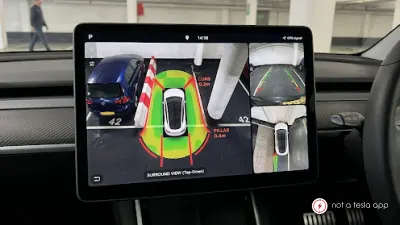
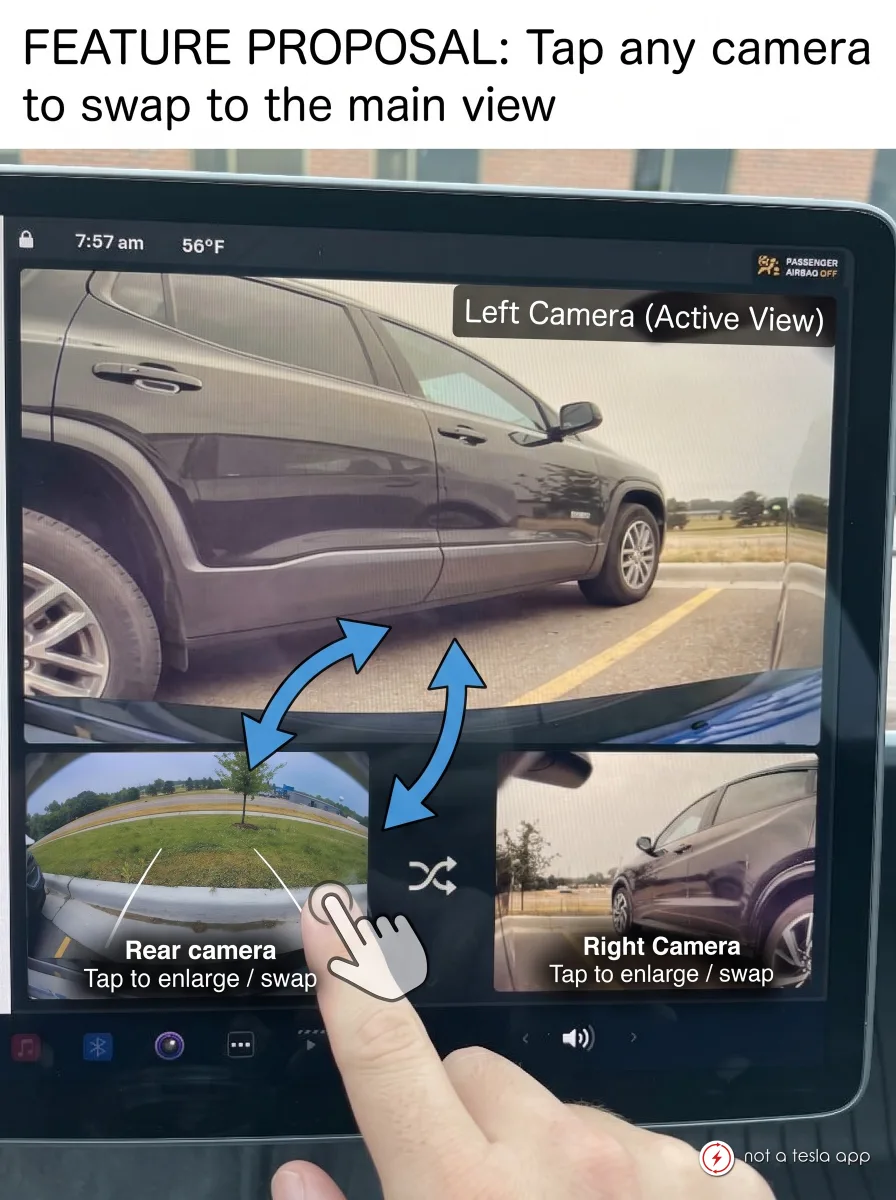
Currently, the rear camera occupies the main top panel while side cameras are shown in smaller bottom thumbnails. While a "Camera Preview" menu exists deep in settings, drivers frequently face tight situations—like maneuvering past low pillars, curbs, or narrow fences—where maximizing a side camera view is critical for safety.
Default View:
When shifting into Reverse or activating the Camera app, the screen loads with the standard layout (Rear view on top, Side Repeaters on the bottom).
One-Tap Swap:
Tapping either the Left or Right Camera thumbnail immediately moves that feed into the main enlarged top panel.
The previously featured camera (e.g., Rear view) automatically scales down into the thumbnail slot of the camera that was just selected.
Visual Feedback:
A subtle highlight border or camera label (e.g., "Left Camera - Active") appears on the top panel to clearly show which angle is enlarged.
Quick Reset:
Tapping the main view or double-tapping the screen instantly restores the default layout (Rear Camera on top).
Alternative:
Buttons to select which camera to feed into the main enlarged top panel (including the B pillars and front cameras)
Vote for this feature
The top three requests at the end of the month will be shared with Tesla.