Say you’re cruising down a deserted highway in your Tesla and you’re starting to get sleepy, or you’re taking a road trip through a national park and the nearest hotel is too far away… so you pull out your mattress from your trunk, fold your backseats down and get ready to spend the night in the comfort of your car. The next thing you do is turn on Camp Mode.
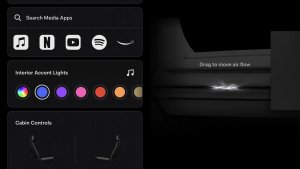
When your Tesla is in Camp Mode it will maintain the optimum temperature and airflow inside the cabin (which you can adjust to your convenience). Your lighting setup will also be maintained, and even the music if you want to listen to some chill tunes while you relax inside your car.
Camp also keeps your low voltage outlet and USB ports powered so that you can charge or use your electronic devices.
The touchscreen also remains on so you can play music, browse the internet, play games in the arcade, or watch shows in Tesla Theater (requires Premium Connectivity or Wi-Fi).
Sentry Mode and Alarm
While Camp Mode is active, Sentry Mode and the vehicle alarm system are disabled, as well as auto lock (so you don’t have to constantly lock and unlock the car as you come and go). Because of this it might be a good idea to manually lock the car when you go to sleep.
How to Turn Camp Mode On
To enable camp mode, set your car to park, tap the temperature icon at the bottom of the screen and then tap on ‘Camp’.
You can also enable it using the Tesla app. Tap the Climate section, slide up the bottom drawer and select the ‘Camp’ option.
Turning Camp Mode Off
To turn Camp Mode off simply shift the vehicle out of Park or disable the mode either via your smartphone or by tapping on the temperature icon at the bottom of your screen and selecting a different mode.
Some drivers recommend creating a Camp driver profile, which automatically sets your preferences for when you're ready to crash for the night. Make any necessary modifications, such as moving the seats all the way forward, and then select your chosen temperature.
How Much Power does it Drain?
In an eight-hour period, the typical battery consumption of Camp Mode is roughly 10% of the charge. The battery will be consumed more quickly if it is really cold or there is bad weather, simply because the car will have to work harder to maintain the interior temperature you've selected.
Even at low temperatures for an eight-hour period, you're looking at a 15 percent usage rate.
Tesla’s vehicles equipped with heat pumps like Tesla Model Y or the 2021 Model 3 should be slightly more efficient while in Camp Mode.
The power drain of Camp Mode, however, is not an exact science, and it will vary greatly depending on many factors such as outside temperature and in-cabin settings - don’t risk depleting your battery.
If you’re staying at an RV park it is good to remember that many of them offer an option to charge your electric vehicle, which would be the ideal condition to run Camp Mode in.
What Happens if the Battery Gets too Low?
You cannot use Camp Mode if the battery percentage goes below 20%, in order to save the battery from depletion and allow you to reach the nearest charging station.
Which Models have Camp Mode?
All current and past Tesla vehicles have Camp Mode as a standard feature. It is also not required to have access to Tesla's Premium Connectivity in order to receive notifications regarding Camp Mode, or to enable it from your smartphone.
Also be sure to check out our in-depth look at Dog Mode if you haven't already.
For a comparison of how Dog Mode compares to Camp Mode and Keep Climate On, check out our article on the feature comparison between the three climate modes.