

Tesla has updated its Tesla app for iPhones to version 4.45.0 and it adds a really helpful feature — Live Activities.
If you’re not familiar with Live Activities on iPhone, they’re essentially an interactive notification that displays real-time information. So, instead of receiving a notification that says that your vehicle has started charging, it’ll display real-time charging information.
What It Displays
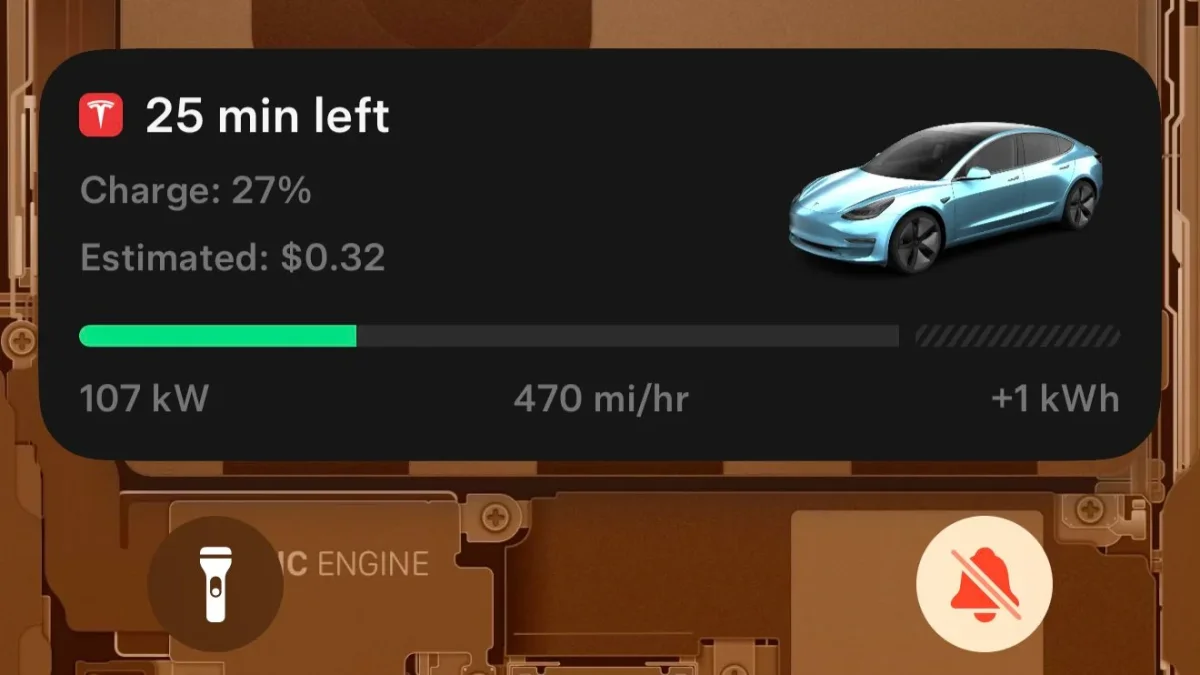
Live Activities are displayed on your lock screen or Notification Center. With Tesla’s first implementation, it’ll display a variety of charging information when you’re Supercharging, such as the time until charging is complete, your current range, and the estimated cost.
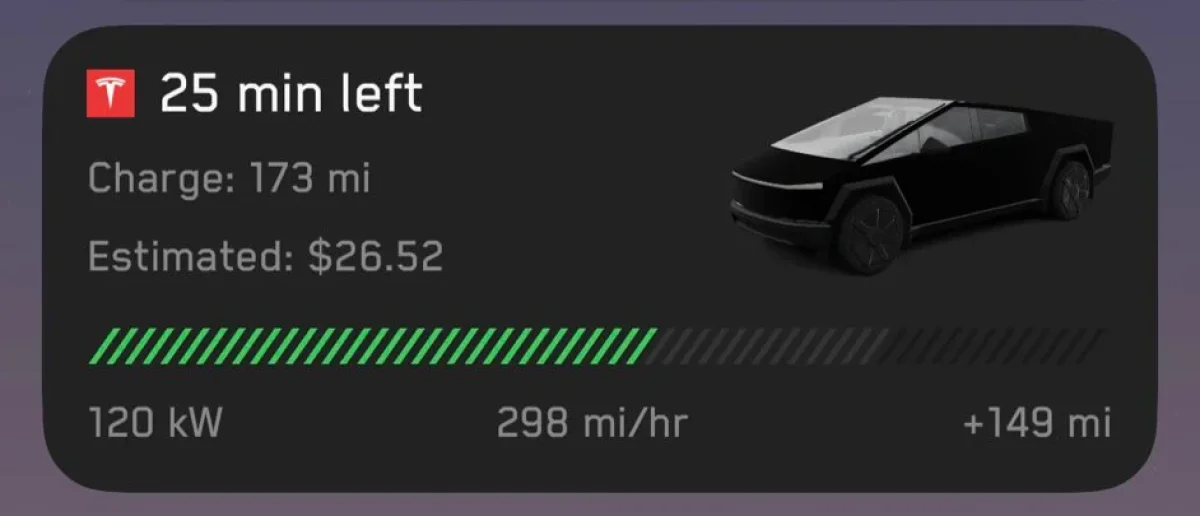
The Live Activity will also display a photo of your vehicle with the color you’ve selected in the Colorizer feature, along with a charge meter, allowing you to easily see how much your vehicle is charged. The meter will be grayed out according to the charge limit you have set in your vehicle.
The “Charge” label of the notification shows your current range and will display the percentage or distance, depending on which metric you use in your vehicle.
In all, the feature will display all of these details:
Time left to charge completion
Charge/range in miles or percentage
Estimated cost
Current Supercharger power
Current Supercharger speed in mi/hr or km/hr
Total energy added in kWh
The battery meter is also different for the Cybertruck, featuring the same slash design on the battery meter as the vehicle uses on its internal display.
What It Will Support in the Future
Tesla may soon support Live Activities for more than just Supercharging. While the feature doesn’t support home charging, or other third-party fast charging, there are other areas that will receive this real-time information.
One that is not often used but is just as crucial as Supercharging is roadside assistance. Tesla could add a Live Activity that keeps you updated without having to open the Tesla app. It could give you the current status, such as help dispatched or offer an ETA when help will arrive.
Tesla will soon introduce a Supercharger queue system, which will be utilized when Superchargers are at full capacity. When you arrive at a Supercharger, you’ll be able to join the queue so that you don’t have to line up your vehicle to form a line physically. Instead, you’ll join the queue and be notified when it’s your turn to charge, letting you relax or eat until it’s your turn. This will be especially useful when there’s a long wait at a Supercharger.
Code for Tesla’s virtual Supercharger queue system is already being added to the Tesla app, and Live Activity support will be included according to code found in a recent Tesla app.
What It Supports
Dynamic Island

The Live Activity is great, but what happens if you’re not on your lock screen? If your phone includes a Dynamic Island (iPhone 14 Pro and later, iPhone 15 and later, but not the iPhone 16e or the iPhone SE), then the Tesla app also shows a circular indicator with your current charge percentage and the estimated time remaining until charging is complete
Apple Watch

The Apple Watch is also receiving support for Live Activities in this update as well. It’ll display the same information as the dynamic island, letting you know how many more minutes you have until charging is complete.
Android Support
While Live Activities has been an iPhone feature for years, Android will be offering similar capabilities in an upcoming OS release. Android 16, currently in beta testing and expected to be released in Q2, will add support for rich notifications similar to Live Activities.
Adding live notifications for Supercharger is a great addition that we hope Tesla will support on Android soon after the feature is released.
Follow Us on Google
Add Not a Tesla App as a preferred source on Google to see more of our stories in Top Stories.
Add to Preferred Sources









