Mars Mode is a fun easter egg that transforms your Tesla’s navigation maps, transporting you from Earth to the Red Planet. When it was introduced, the feature was just a map overlay, but Tesla has recently updated it with additional improvements.
Here’s everything you need to know about Mars Mode, how to activate it, and its latest features.
What is Mars Mode?
Mars Mode is one of Tesla’s earlier Easter Eggs — a feature that was originally hidden and needed to be activated by inputting a code. Users would have to tap and hold the Tesla ‘T’ logo that used to appear in the status bar, then enter the code ‘Mars.’
Nowadays, it can be easily activated by going into the Toybox and choosing Mars Mode.
Mars Mode Features

While Mars Mode has always swapped out the navigation map for the surface of Mars, Tesla has recently added some additions to the feature.
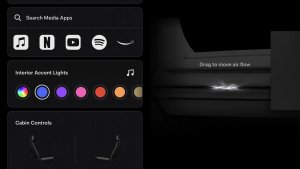
The additions include switching the vehicle’s ambient lighting to orange and switching the airflow shown in the climate menu to red. Tesla now also switches the background in the parked visualization on AMD Ryzen vehicles.
All the features in Mars Mode include:
Your navigation map is replaced with a high-resolution map of the Martian surface
Your vehicle avatar is swapped out for a Mars Rover on the map
In vehicles equipped with RGB ambient lighting, Mars Mode sets the cabin lights to a light orange
For AMD Ryzen vehicles, the parked visualization will include a Mars-themed background\
Climate visuals on the vehicle touchscreen will show red airflow (even if cold air is blowing)
Climate visuals on the Tesla App will show orange airflow
Tesla used to include an additional feature, but has since removed it. Originally, the vehicle visualization that showed up in the Software menu would also be swapped out for the SpaceX Starship. However, it now continues to show a visualization of your vehicle as usual.
Cool!! pic.twitter.com/3mcTMuKCOf
— Tesla King (@TeslaKing420) October 29, 2025
How to Activate It
There are two ways to activate Mars Mode: the easy way and the original, “Easter Egg” way.
For the easy way, head over to Apps > Toybox, and then navigate over to the Mars card. Declare yourself an Interplanetary Species and activate the feature.
For the original method, head to Controls > Software, then tap and hold your vehicle’s model name until you see a small ripple. Let go, and a prompt will appear to enter a code. Type ‘Mars’ and tap OK to activate Mars Mode.