


The 2025 Holiday Update has officially been revealed, and while the headline feature is undeniably the integration of Grok into vehicle navigation, the real story is the sheer volume of wishlist items that Tesla has finally checked off.
From addressing minor quibbles and quality-of-life improvements to adding major new features, this Holiday Update includes a mix of both.
Grab your socks, because Santa Optimus will soon be delivering these features.
Update: The 2025 Holiday Update is now rolling out to customers with update 2025.44.25.1.
Grok Commands
The biggest new feature for the 2025 Holiday Update is that Grok can now add and edit navigation destinations. You can now ask Grok to add a stop or change destinations. The best part? You can add multiple destinations in a single command.
To use this new functionality, you’ll need to ensure Grok’s in-vehicle personality is set to Assistant. Navigation Commands won’t work in Storyteller, Language Tutor, or other modes.
Given Grok is only available on AMD vehicles in the U.S. and Canada, we don’t expect this feature to be available to vehicles equipped with an Intel MCU, at least for the time being.
Unfortunately, we haven’t heard anything about Grok expanding outside of North America yet.
Navigation Improvements
Each year, there are a lot of improvements for navigation and charging, and this year is no slouch either.
The navigation menu has been reorganized, and you can now reorder your favorites to whatever you like, rather than the default order of whatever came first. You can also now set Home and Work by dropping a pin on the map, rather than having to be in the location to set them.

Tesla now also shows suggested destinations based on your recent trips and habits while you’re parked, in a little extension to the UI below the navigation search bar. This appears to show a pair of recommended destinations, but the list can also scroll left and right to show more.
Tapping the navigation search will pop open the full list of recent and recommended destinations. We expect this feature to be available for all vehicles.
Supercharger Site Maps
Tesla has added 3D views of certain Tesla Supercharger locations. When you’re looking at the Supercharger in the navigation menu, you can now tap “View Site Map” to see this 3D map.

When you’re navigating to the location, upon your arrival, the 3D site map will be displayed, showing a top-down 3D view of the site layout and live occupancy of each stall. We expect that you’ll be able to tap any location to park, allowing you to select a spot even out of view.
Given this is a 3D rendering, this one may only be available for AMD-equipped vehicles, but it’s less clear. Hopefully, Intel vehicles will also receive it, even if it doesn’t include the 3D Superchargers.
Automatic HOV Routing
While Tesla already includes an option to use HOV lanes when navigating, it has been a manual setting. They’re now adding support for intelligent HOV routing based on HOV lane restrictions.
Routing will automatically select the HOV lane when your vehicle is eligible, based on time, location, passenger count, and local restrictions.
You will need to enable HOV lanes from Controls > Navigation > Use HOV Lanes. We expect this feature to be available for all vehicles, however, it may be limited by region.
Charge Limit Per Location
You can now set a maximum charge limit for your current location. That means if you like to only charge to 50% at a certain location, or 100% at another, you can have that limit stick when you next arrive. No more forgetting to change the limit and having to check your app.
We expect this to be available for all vehicles.
Dashcam Viewer Update
The Dashcam Viewer has received another significant update. Clips from the Dashcam now display additional details directly in the Dashcam UI. Tesla displays a module on top of the dashcam video that displays the vehicle’s speed, gear, steering wheel angle, accelerator and brake pressure, and self-driving state.

That means we’ll no longer be guessing if a dashcam video we see on the internet involved the use of FSD, and we can accurately get the details of the situation.
Given that both Intel vehicles and the Cybertruck were recently updated to the new Dashcam Viewer, we expect this feature to be available for all vehicles.
Phone Left Behind Chime
A holiday wish finally came true. Your vehicle will now chime a few seconds after the doors close if a phone key is inside the cabin or a phone is left on the wireless charger and no occupants are detected.
This feature requires Ultra-wideband (UWB), which is available on 2024+ Model 3s, 2025+ Model Ys, 2021+ Model S and Model X vehicles, and all Cybertrucks.
Enable/Disable Wireless Charging Pads
Tesla has finally added the ability to turn off the phone toasters - the wireless phone charging pads in your vehicle. Musk suggested this was coming back in 2022. This was an often-requested feature from users whose phones would heat up and not charge. We have a whole wish list dedicated to improvements for Tesla’s wireless chargers, and this was one of them.
For Models S3XY, this can be done from Controls > Charging, and for the Cybertruck, from Controls > Outlets & Mods
Spotify UI Update
Spotify also got a minor update with this release, which includes the ability to add new tracks from your search to your queue instead of changing what’s currently playing. Tesla is also adding the ability to scroll through large playlists without paging.
No Spotify Hi-Fi support quite yet, but we’ve got our fingers crossed for a future update. We expect the new UI to support all vehicles.
Tesla Photobooth

Tesla has added a fun new photobooth mode using the cabin camera. From Toybox > Photobooth, you can now take an in-vehicle selfie, slap some fun stickers on it, and then share it right from the Tesla App on your phone.
This feature will require vehicles equipped with a cabin camera and potentially an AMD processor.
Santa Mode Update
Santa Mode has received a makeover, including festive snowmen, trees, a unique lock chime, and snow effects. It also looks like Santa Optimus and his presents are in every vehicle, rather than just the Cybertruck’s unique Santa Mode.

We expect this feature (or most of it) to be available to all vehicles. The parked visualization and falling snow might be simplified for older Intel vehicles.
Tesla currently displays elves for pedestrians, so it’ll be interesting to see where they choose to place snowmen and trees. Will they be placed randomly around the vehicle, or will they be placed when it detects trees and other obstacles?
Light Show Update
A new light show has been added, Jingle Rush. Alongside that, some minor updates to light shows, including new color display effects, interior lighting controls, and longer light shows.
We’re looking forward to what the light show community gets up to with these new features.
Custom Wraps & License Plates

Custom wraps and license plates have finally arrived for all vehicles models. Initially debuting on the Cybertruck in the 2024 Holiday Update, you can now personalize your vehicle with pre-loaded or custom wraps and license plates (using your glove box flash drive).
However, this isn’t just the Cybertruck feature becoming available on other models. Tesla is also adding the ability to tint your windows, including the Cybertruck. Check out our guide on how to create your own custom wraps.
To access these you’ll go to Toybox > Paint Shop once you receive the holiday update. License plate and tint options are available at the top.
This feature may be limited to AMD Ryzen vehicles, and it’ll only initially be available for Model 3, Model Y, and Cybertruck.
SpaceX ISS Docking Simulator
Tesla has added another game, and you can now play astronaut from Arcade > SpaceX ISS Docking Simulator. You can control and guide your SpaceX Dragon pod towards the International Space Station with controls based on the actual interfaces used by NASA astronauts.

We expect this game to be available on AMD-equipped vehicles.
Rainbow Rave Light Sync
Light sync has gotten an update - you can now use rainbow colors rather than album-matched (or single-preset) colors during Rave Mode while parked. The accent lights will change along with the beats of your music.
This feature requires a vehicle equipped with interior ambient lighting.
Light Cycle Lock Sound
The Tron Mode Light Cycle lock sound has been added as a default sound in the Lock Sounds list - a big wish from many since the release of Tron Mode.
You can check out even more lock sounds at our ever-expanding Lock Sound list here. This should be available to all vehicles.
Dog Mode Live Activity
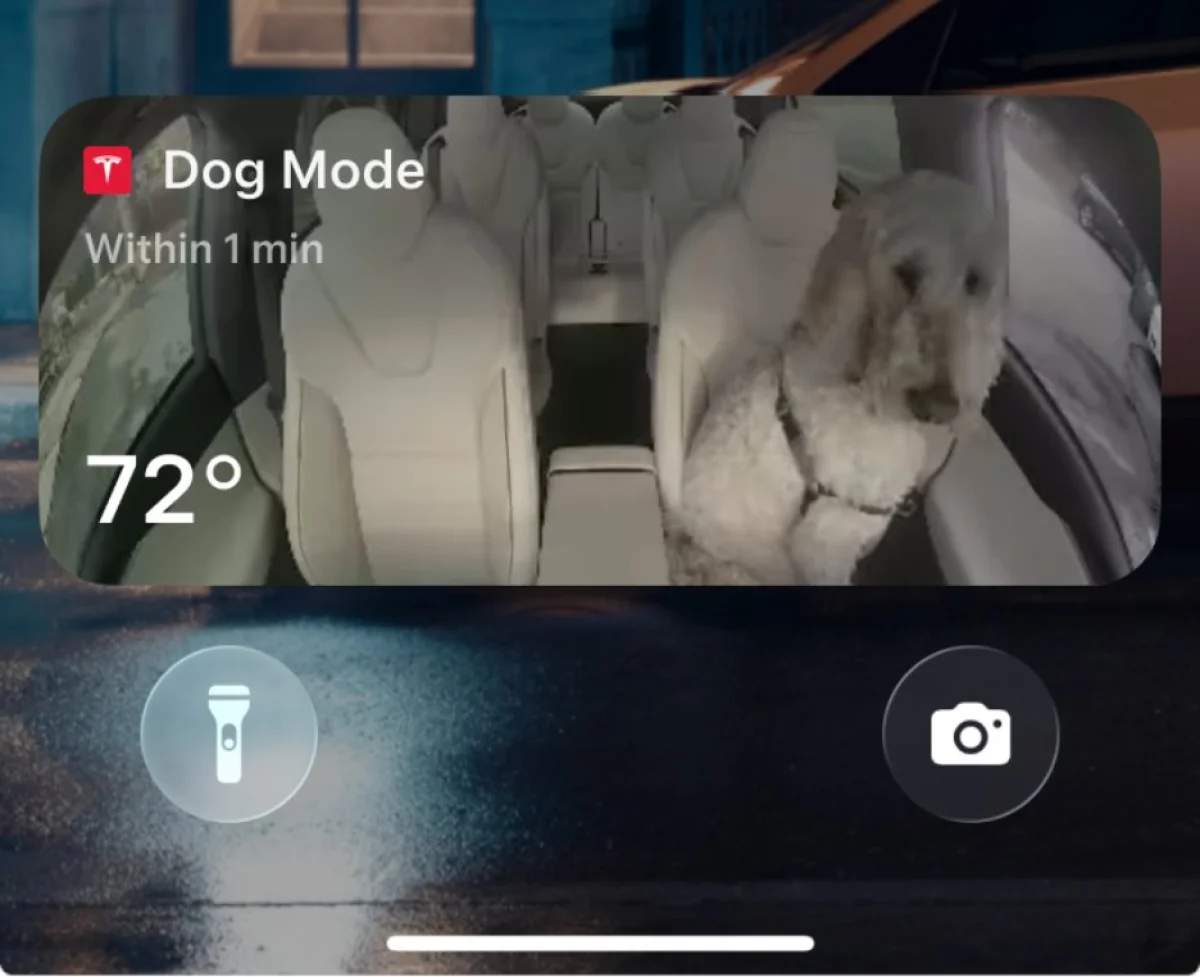
Dog Mode is now available as a Live Activity for iOS users. A snapshow of your cabin interior will be sent to your phone periodically, along with updates on the interior temperature, vehicle state of charge, and exterior climate conditions.
The Live Activity will keep an updated photo of the interior of the vehicle, letting you keep an eye on your pooch directly from the lock screen.
CarPlay
The big omission in this year’s holiday update is CarPlay, which was rumored to be in development. There were rumors that CarPlay was getting mixed up with AirPlay, but it looks like we’re not receiving either feature, at least right now.
In our article, we speculated that CarPlay may be exclusive to the Robotaxi, which would make a lot of sense for non-Tesla owners using the taxi service. However, there’s still a chance Tesla could be actively working on CarPlay to be released in the future.
Release Date
Tesla announced the features of the holiday update tonight. Tesla typically tries to get ahead of leaks, so tonight is likely the day wave 1 employees also start receiving the update. Wave 1 employees typically receive an update a few days to about a week before the general public.
We expect the holiday update to be version 2025.44.25, but that could change if any issues are found and need to be fixed. We expect the update to start rolling out to select users sometime next week.
There’s a lot packed into this update, but Tesla doesn’t always reveal every feature, so there may be more to discover when this update starts rolling out.
Update: Now that the update has started rolling out, be sure to check out the official release notes.
Follow Us on Google
Add Not a Tesla App as a preferred source on Google to see more of our stories in Top Stories.
Add to Preferred Sources









