With the launch of unsupervised Robotaxi rides in Austin, early passengers are discovering that the controls in the front seat don’t work the way they do in a consumer car. Because the Model Ys serving as Robotaxis still have physical controls (unlike the upcoming steering-wheel-free Cybercab), Tesla has implemented a software lockout to prevent passengers from hijacking the ride or getting unruly.
The Vestigial Steering Wheel
In passenger seat now pic.twitter.com/rjfkos2ZCe
— TSLA99T (@Tsla99T) January 22, 2026
For the first time in a Tesla with FSD active, the steering wheel rejects control input, and the vehicle does not disengage FSD.
If a passenger reaches over and tugs on the steering wheel while the car is in motion, the vehicle ignores the input. A red exclamation warning - similarly sized to the small warnings in your own Tesla- pops up and says, “Do not touch the steering wheel. If action continues, the vehicle will pull over.”
Because the steering wheel in the Model Y is still connected using physical linkages rather than steer-by-wire like in the Cybertruck, passengers must keep their hands to themselves.
This behavior confirms that while it isn’t currently accessible, Tesla may be considering letting passengers sit in the driver’s seat as well. The car is the captain now - the humans are just along for the ride.
The ability to change the vehicle’s behavior when the steering wheel is moved likely also means that Tesla could implement NVIDIA’s cooperative steering feature if it chose to.
Robotaxi User Interface

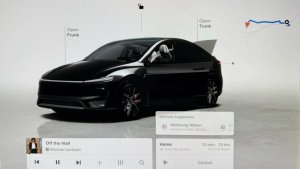
Because there is no driver to monitor speed or range, the central display has seen a slight passenger-focused overhaul. The standard driver-focused layout, where the left third of the screen is dedicated to driving information, has been scrapped in favor of a Robotaxi layout.
The speedometer, gear selector, and turn signal indicators - normally all fairly prominent - have been shrunk and tucked away into the top-left corner of the display. They are there for reference - not for vehicle operation.
The media and navigation boxes that were there with the safety monitor, the same ones we have in our cars, are now gone, opening up the visualization even more.
The dock has been revamped, with app icons, media controls, and other buttons crammed into the bottom row. The app icons shown are Apple Music, Tesla Arcade, Spotify, and what appears to be a new ‘All Apps’ icon.
The media controls have been significantly enlarged. Tesla assumes users will be more interested in changing the song, selecting their next show, or seeing their ETA than in monitoring the car’s current driving status.
Two massive new buttons anchor the bottom corners of the screen. On the left, a Pull Over button allows passengers to safely end the ride at the nearest safe location, while on the right, a Support button connects the rider to Tesla’s remote operations center at Giga Texas for assistance.
The Bridge to Cybercab
This software interface serves as a bridge between the current Model Y and the dedicated Cybercab. By locking out the controls and shifting the UI focus, Tesla is effectively showing off what its end-goal UI will look like for both Cybercab and Unsupervised FSD in consumer cars.