


Tesla has officially announced its Summer Update, which is expected to be update 2026.26 (based on a recent app decompile), and it’s full of exciting features. With this update, Tesla is adding some Grok vehicle commands, the ability for the vehicle to remember your preferred routes, and much more.
Let’s dive into it.
Grok Vehicle Commands

Tesla is expanding Grok’s capabilities by adding a slew of vehicle commands. With this Summer Update, Tesla is adding support for making phone calls, searching and playing music, adjusting climate, and opening the glovebox.
Adding the ability to make phone calls and play music in addition to the recently added navigation features knocks out our most-used voice commands.
It’s not clear yet, but it sounds like you’ll also be able to use it to turn on your ventilated or heated seats, which will make these tasks even faster than using the touchscreen, especially with the recent addition of “Hey, Grok.”
Now that Tesla has added these, we can look forward to being able to switch vehicle settings and FSD commands in the future.
Grok Available in All of Europe
Tesla has announced that with this update, Grok will now be available in all of Europe, which appears to include navigation commands and the new vehicle command features.
Send Custom Wraps from Tesla App

If you love customizing your Tesla, this is a huge addition. You will no longer have to remove your USB drive from your vehicle in order to add custom wraps for your car.
Tesla is adding the ability to add custom wraps directly from the Tesla app. That means you’ll be able to download it directly from a website or social media and upload it directly to your vehicle.
Tesla didn’t provide any additional details, but the custom license plate feature is also closely tied to custom wraps, so it’s possible that it may be included as well.
Now, we’d love for Tesla to add support for custom lock sounds in the future.
Update: We now have our first look at how this will work in the Tesla app, along with the requirements.
Set Arrival Energy from Mobile App

This is a feature we’ve seen coming in the Tesla app due to UI changes. Similar to what Tesla added in the vehicle with the 2024.44 update, you’ll now be able to set your arrival energy through the Tesla app.
This lets you arrive at your destination with plenty of charge in order to drive around your destination or with enough charge to get to a charger the next day.
Automatic Navigation

Tesla is also improving its automatic navigation feature. This feature is amazing when it actually understands where you want to go. Up until now, it’d automatically navigate to work, home, or events in your calendar, but Tesla is now expanding it to include other common destinations.
It sounds like Tesla will be leveraging the suggestions it already displays next to the Home/Work buttons, but if it meets a certain likelihood, the vehicle will set up routing to the destination as well.
Caraoke Score
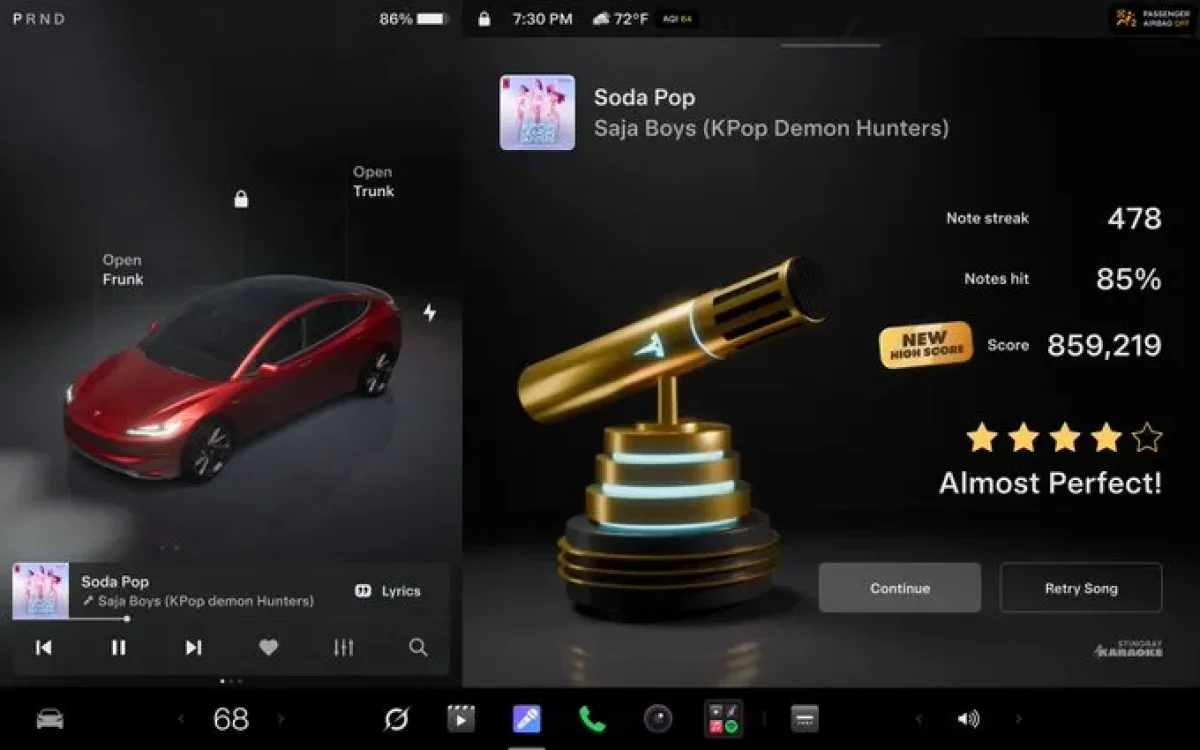
Tesla launched Caraoke in 2018, almost a decade ago, but they’re now improving the feature by scoring the songs you belt out.
In 2024, Tesla added a Caraoke mic to its shop, letting backseat passengers more easily join the fun. With this addition, this will likely be an even more popular accessory.
In 2024, Greentheonly also found references that hinted at the ability to record your sessions, so that could be a feature that gets added in the future. If it does, we hope Tesla adds the ability for the sessions to show up in the Tesla app, making it easy to share the videos on social media.
According to Tesla, Caraoke scoring will be limited to when the vehicle is in park.
Preferred Routes

One of the biggest features in this release is the ability for the vehicle to remember your navigation preferences. Tesla states that the vehicle will now prioritize routes that you’ve taken before.
Regardless of whether you’re driving the vehicle or you’re using FSD, the navigation will now take your previous routes into consideration.
It’ll be interesting to see how Tesla does this while also giving you the fastest route. We imagine there will be a threshold that if the Tesla-calculated route is much faster than your previous routes, then it’ll favor the faster route.
Seat Controls

When Tesla introduced the cheaper “Standard” models, they removed the physical seat control buttons from the side of the front seats. Instead, drivers and passengers are required to adjust their seat on screen.
This feature was only available on vehicles without the physical seat controls; however, now it looks like it’ll arrive for all vehicles in this Summer Update.
The image above is a screen capture of a segment of the video Tesla shared about the upcoming entry animation. If you look closely, you can see the seat control button in the dock.
Rear Display Lock

In the last update, Tesla added parental control preferences that let parents or guardians completely block Tesla Theater, the browser, and Tesla Arcade.
This change simply locks the rear screen for passengers in the rear seat, preventing them from accessing videos, games, or any other features. This is likely aimed at younger children who may accidentally change the video they’re watching or climate settings.
Self-Driving Stats in App

In our recent app decompile, Tesla strongly hinted at the Self-Driving app coming to the Tesla app. With this update, Tesla is finally introducing the ability for you to view your streaks directly from the app.
It looks like most of the features from the vehicle will be available, including tutorials and your various streaks, as well as total miles driven on FSD.
Update: This feature is now live with the latest Tesla app. Check out our first look at the new Self-Driving Stats in the app.
FSD Visualization Improvements

The Summer Update is also introducing the ability to set custom zoom levels, not on maps, but on the self-driving visualizations.
This addition is interesting, as the vehicle already does a great job managing zoom levels based on surroundings. For example, if you’re approaching an intersection, the visualization will widen, letting you see the entire intersection. The zoom will also vary depending on your direction, speed, and whether you’re near any other vehicles.
Next up, we hope Tesla adds the ability to set zoom levels for maps, which could be even more useful.
Browser Now Supports Camera and Microphone

Tesla is giving the built-in browser access to the vehicle’s cabin camera and microphone when the user accepts the requested permissions by a website.
This will open a whole new set of apps that can be used in the browser. It should open up the door for communication apps such as Discord, Google Meet, and Microsoft Teams. Tesla already has support for Zoom on AMD-based vehicles, but this will give users access to a much wider variety of apps.
Zoom was already a web-based app, so it’s surprising it took Tesla this long to open up access to others.
Entry Animations
https://t.co/E2peHM24M6 pic.twitter.com/l7bAS3A6LB
— Tesla (@Tesla) July 21, 2026
Some of the smaller features of this update include entry animations for the new Model 3 and Model Y. This sounds like it’ll support the 2024+ Model 3 and the redesigned Model Y.
The intro animation will likely be similar to the Launch Series and the ones available on the Model S and Model X. Tesla shared the video above.
Apple Music Improvements

Tesla is also making improvements to Apple Music, which is now the second most popular music streaming service. In this update, Tesla is adding the ability for users to be able to add songs to their queue directly from the search and artist pages.
Supercharging Improvements
In addition to the improvements above, Tesla is also making it easier to find your favorite Superchargers. You’ll now be able to search for Superchargers directly by name, such as Tesla Diner, in addition to their address.
Other Improvements?
This update hasn’t started rolling out yet, so we don’t have the complete release notes, and there could still be other minor improvements or features that are limited to certain regions.
Roll Out
Tesla simply announced the update as “rolling out shortly.” However, when Tesla posts the features in a new update like this, the actual rollout isn’t too far behind. We expect Tesla to start gradually rolling out this update as early as this week.
However, in typical Tesla fashion, it’ll be a gradual release, with only a fraction of a percent of vehicles getting the update on the first wave. Vehicles on the latest FSD builds will have to wait longer until these features are merged into the FSD branch.
Follow Us on Google
Add Not a Tesla App as a preferred source on Google to see more of our stories in Top Stories.
Add to Preferred Sources










