


Tesla owners can now track their autonomous driving habits right from the palm of their hand. Rather than having to step inside the vehicle to review their Full Self-Driving (Supervised) metrics, key usage statistics are making their way straight to the Tesla app on mobile.
When Tesla announced the Summer 2026 Software Update this week, it confirmed that a mobile version of the dedicated Self-Driving app that’s available in the in-car UI was on the horizon. That feature is rolling out now, ahead of the Summer 2026 feature drop that’s expected to be available soon with software update 2026.26.
In-Car Stats Move to Your Phone
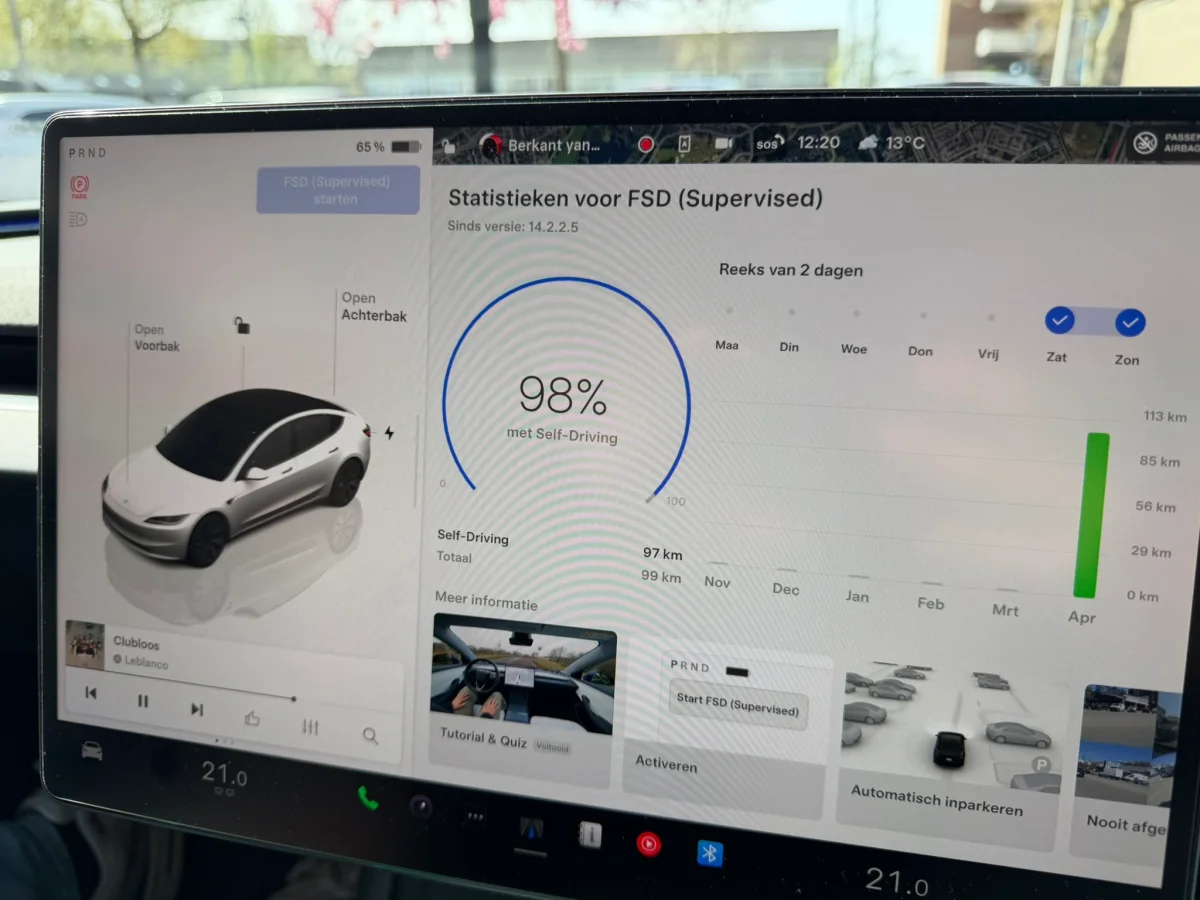
The standalone Self-Driving app first debuted in Europe before rolling out globally to vehicle touchscreens with the Spring 2026 Software Update. Now, with Tesla app version 4.59.0, those same insights are available on your phone.
Opening the new Self-Driving menu in the app displays a complete breakdown of your driving history. A prominent ring graphic displays the percentage of total miles driven using FSD, which you can also peek at in the app’s navigation panel under Self-Driving without even opening the section. You can view your current daily FSD usage streak (only counts days the car was actually driven), your longest continuous FSD streak (in miles), and your total self-driven miles since FSD version 14.2.

The interface includes a monthly bar graph showing self-driven miles per month. You can tap on an individual month to see its total distance figure, but you can’t scroll backward or forward through past months beyond what the app displays yet. Adding a full historical view would be a great quality-of-life upgrade down the road.
If you want to show off your FSD usage numbers, tapping the Share button in the top-right corner lets you quickly export an image of your stats to your phone’s photo gallery.
Feature Guides and Compatibility

Beyond raw numbers, the new section acts as an educational hub for core driving features — much like the Self-Driving app on your vehicle. Scrolling through the “Learn More” area brings up guides on FSD features like Speed Profiles, which you can switch between Sloth, Chill, Standard, Hurry, and Mad Max modes. It also explains Arrival Options like Park and Pull Over, alongside overviews of Actually Smart Summon, Tesla’s camera-based safety systems, and more.
The new Self-Driving section in the mobile app is available now for HW4 vehicles running FSD v14.2 or later, as well as HW3 vehicles running FSD v14 Lite (which just started rolling out publicly this week). As long as your Tesla app is updated to version 4.59.0 or higher, you can check out your FSD stats on mobile today.
Follow Us on Google
Add Not a Tesla App as a preferred source on Google to see more of our stories in Top Stories.
Add to Preferred Sources










