Tesla’s Cybercab has recently been spotted running its native in-car interface, giving us a closer look at software that passengers normally may never see. The UI is very similar to the interface used in other Teslas, but Cybercab riders will likely only ever interact with Tesla’s simplified Robotaxi interface, which focuses on the destination, ETA, map, media, and passenger controls rather than exposing the vehicle’s full settings.
What’s New in the UI

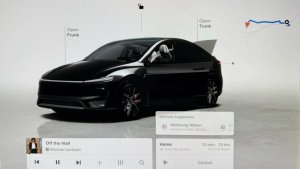
The native interface looks immediately familiar. The main visualization features a gold Cybercab on a gold-toned background, while the Controls menu resembles the one used in current vehicles, with some exceptions.
Turn-signal icons remain visible in the top status bar even when the signals are inactive, and a dedicated windshield-wiper button likely brings up windshield wiper controls.
The Controls menu looks familiar, but it includes two new options, one for Robotaxi and another for Rodeo. It’s not clear what’s in either menu, but it looks like Rodeo is used for employees to provide feedback on the Robotaxi’s performance.
Separate Rodeo Controls also appear along the bottom of the display, with large buttons labeled Short Oops, Long Oops, Win, and Voice Note, plus a shortcut to drive settings.
New Split Screen Maps?

The Controls menu itself opens in a split-screen layout, leaving part of the map visible above the settings rather than covering it completely. It’ll be interesting to see whether this applies to all apps like Spotify and more.
This would be a notable improvement over the current production version and a feature that we hope arrives in a future software update.
New ‘Roaming’ Status
Another screen shows Cybercab’s full-screen vehicle visualization with a new “Now” status that’s set to “Roaming.”
This is the first time we’re seeing “roaming,” which likely implies that the Cybercab is traveling the streets without a rider and an exact destination.
This is where Tesla data and smarts come in. Instead of staying put in a location after dropping off a rider, the Cybercab will traverse the streets, likely making its way to more populated or congested areas, even if another rider hasn’t been confirmed. By anticipating when and where the next passenger is coming, Tesla can reduce wait times and keep the robotaxis busier throughout the day.
Tesla Employees Are Rating Cybercab Trips

Tesla is also gathering detailed feedback during Cybercab testing. A Cybercab spotted during an employee drive displayed a web-based evaluation form with a 10-star ride rating and several yes-or-no questions. One visible question asks whether the trip is acceptable for unsupervised cars.
The evaluation is part of the Cybercab’s employee testing at Gigafactory Texas before Tesla opens up rides to the public. Tesla began preparing employee rides earlier this summer.
These new tools and controls offer a rare look at what happens during robotaxi or new-vehicle testing.