Stepping into an autonomous vehicle usually means sitting back and letting neural networks handle every input. Because the Cybercab is built purely for driverless transit, the interior completely eliminates steering wheels, turn stalks, and floor pedals. However, a passenger in Austin recently hopped into a ride only to discover an exposed internal control interface intended strictly for Tesla personnel and technicians.
X user @MatthewSkrzypc1 encountered the rare diagnostic screen during a routine trip, sharing a video of the interface in action:
“When I got in the vehicle, the display was in a different configuration with a virtual joystick for manual driving! I have a feeling I wasn’t supposed to see this… but I try to manually drive the vehicle anyway!”
Weird #cybercab situation! When I got in the vehicle, the display was in a different configuration with a virtual joystick for manual driving! I have a feeling I wasn’t supposed to see this… but I try to manually drive the vehicle anyway! 😂 @wholemars @DirtyTesLa @DavidMoss… pic.twitter.com/mQsoDFDbEJ
— Matthew Skrzypczak (@MatthewSkrzypc1) September 7, 2026
Indeed, Matthew (or any other Robotaxi rider, for that matter) isn’t supposed to see this screen. The Cybercab is designed to drive itself, but this interface lets service technicians or validation testers manually move the Cybercab if and when necessary. We recently saw these onscreen driving controls in action when a validation tester used them to reposition a Cybercab at an Austin Supercharger. However, this latest encounter provides our clearest up-close look yet at the layout of this software interface.
Robotaxi with NO DRIVER and NO WHEEL parking at a supercharger here in Austin Texas!!! pic.twitter.com/syhLquvjCb
— Caleb Barry (@BarryGoodStocks) August 30, 2026
Virtual Joysticks and Brake Buttons
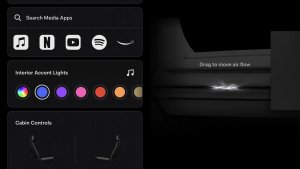
The exposed interface looks like a dedicated debugging screen rather than the consumer entertainment UI. Off to the left of the display, a circular virtual joystick handles steering angle. Tapping and holding on the joystick and sliding it up or down manages forward and reverse throttle, while you can slide it right and left to turn. There are also manual buttons to apply the brake, honk the horn, or close the cabin doors. It’s unclear if manual driving through this interface has a speed cap.
While the passenger was able to tap and drag the on-screen joystick, with the visual controls actively tracking their touch inputs, the car didn’t move. This indicates that the screen being on display was likely a software glitch and the system simply failed to revert to passenger mode before the ride began. For obvious safety reasons, it looks like the vehicle’s backend systems prevent unauthorized riders from actually engaging drive motors through the screen.
An Impractical Fallback for Necessary Edge Cases
Reaching toward the center of a dashboard to steer an automobile using onscreen controls is unusual and pretty impractical for everyday commuting. But the Cybercab isn’t supposed to be driven by humans anyway.
The two-seater was engineered from scratch around Level 4 autonomy, which Tesla demonstrated for the first time at last week’s launch event in Austin. In the real world, however, service staff and depot crews still require a fallback method to reposition cars around repair lifts, make tiny parking corrections, or roll vehicles onto flatbed tow trucks if cameras are blocked. Touchscreen controls provide that functional baseline without cluttering the cabin with driving hardware.
Now that Cybercabs are officially offering public Robotaxi rides across Austin, software patches will likely lock down these developer menus so standard riders never accidentally stumble across them.