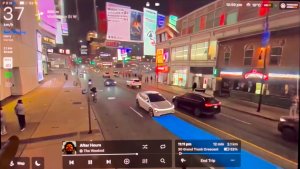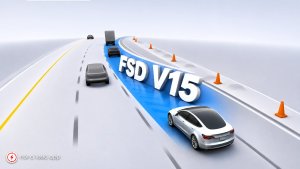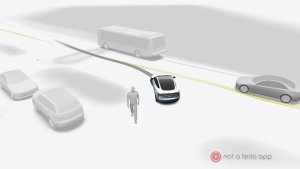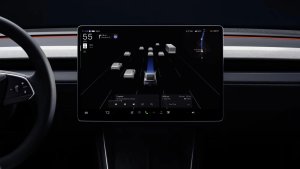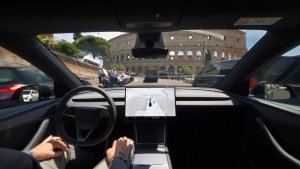
Reality View is the most noticeable change in FSD v15. Instead of the familiar gray cars and lane lines, it shows a realistic, live 3D view of the world around your car, seen from a virtual camera above it. Tesla started rolling out FSD v15 over the weekend, but only to a small group of newer vehicles so far.
So how does it actually work? One Model 3 owner tried to rebuild Reality View himself using just his car’s dashcam footage, and Elon Musk shared some details on X.
Rebuilding Reality View From Dashcam Footage
YouTuber Ryan, who goes by vogel, doesn’t have FSD v15 on his Model 3 yet, so he decided to build his own version of Reality View using about 13 minutes of footage from his car’s six cameras.
First, he worked out exactly where each camera sits by lining up the same details, like a crack in the road, across overlapping views. Along the way, he found that Tesla’s cameras are up to 8.7 ms out of sync with each other, which Tesla likely corrects for in software. He then estimated depth from the flat video and built a 3D scene around the car using Gaussian splats.
His first attempt was rough, with smeared trees and floating poles. To fix that, he ran a loop that compares his renders with the real camera images and nudges the 3D scene closer each round. After about three hours, he had a full 3D world he could fly around in. He used lane lines, which several cameras can see at once, to line up the road. Then he cut moving cars out of the scene, tracked them separately, and replaced each one with a clean 3D model.
The result looks surprisingly close to Tesla’s, complete with a blue FSD path in front of the car. Take a look for yourself:
He also tried pure diffusion and AI image generation, but said that “all of that stuff failed.” He believes Tesla does something similar to his 3D approach, then uses a diffusion model for the “last 10%” to make everything look realistic. He’s made his project open source on GitHub so others can build on it.
How Tesla Does It
According to Musk, Tesla has had a “pixel-perfect world model since last year,” which it uses to create synthetic training data for FSD. What runs in your car is a much smaller version of that.
FSD’s vision encoder turns what the cameras see into data the driving model can use. Reality View branches off from that same data and runs it through a separate model with about one billion parameters. That model takes the previous Reality View frame, adds some noise, and then cleans it up into the next frame. Musk said each cycle produces a short video clip of eight images at 36 frames per second, sized to fit the car’s screen. The last frame from that clip is then used as the input for the next batch.
This is absolutely INSANE
— Nic Cruz Patane (@niccruzpatane) November 22, 2026
Tesla FSD V15 Reality View in a busy downtown setting pic.twitter.com/n4DWxumS7p
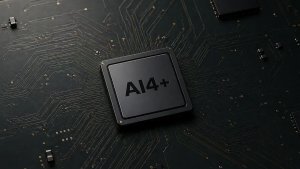
It does all this on a small slice of the car’s computer. Musk said Reality View gets only “half a TRIP out of three” on one of the computer’s two chips, and he admitted that “the latency is a bit high due to compute constraints.” Tesla has a way to cut about 35% of that delay, and Musk said the upcoming AI5 chip will offer much better performance.
It Looks Real, but What Does FSD See?
Reality View looks impressive, but there’s a tradeoff. The old visualization was a fairly direct look at what FSD detected: if it showed a red light or a car, you knew FSD had spotted it. Reality View is closer to video from the cameras mapped onto 3D shapes. A reflection, for example, is just part of the image, kind of like a graphic asset inside a video game, and not necessarily something the car understands.


If something shows up as a 3D object, FSD has likely detected that something is there, even if it doesn’t know what it is. Flat things like crosswalks or traffic lights are harder, though, since there’s no way to tell whether FSD actually picked them up or they’re just part of the video. Earlier FSD versions relied on drivers using the visualization to confirm what the car saw. Now that FSD is more capable, that matters less, but with Reality View, Tesla is clearly moving away from showing exactly what FSD sees and reacts to on the screen.
FSD v15 also represents a shift from the way FSD has worked: detecting objects and placing them on a 3D map, which we’ve previously explored in our How FSD Works series.
What’s Next
More frames and a higher frame rate for a smoother Reality View is one of the most requested improvements, and Musk’s comments suggest it’s coming. FSD v15 is still limited to a small number of owners, but Musk said last week that v15 will go to wide release with this year’s Holiday Update next month. Reality View should keep improving until then, and even more once AI5 arrives.
Follow Us on Google
Add Not a Tesla App as a preferred source on Google to see more of our stories in Top Stories.
Add to Preferred Sources