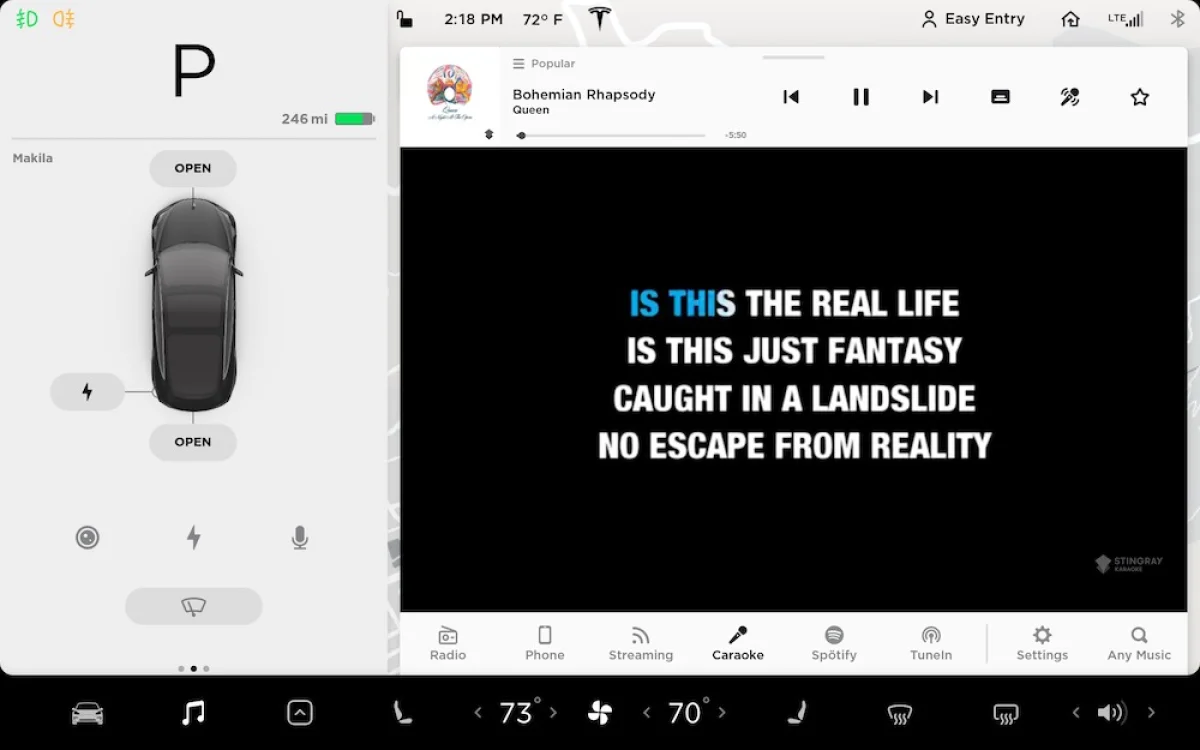

Tesla Caraoke is Tesla’s version of karaoke. It’ll allow you to play and sing some of the most popular karaoke songs, right in your car. Caraoke will display song lyrics directly on the screen without interfering with any critical information the driver needs to drive safely. The songs can be played with vocals or without. However, it does not have the ability to use a microphone or record you singing.
Tesla Caraoke is free to use, although it does require Tesla’s Premium Connectivity plan to stream the song or you can also use your phone as a hotspot or use WiFi
How to Access Caraoke
To access Caraoke tap the Music icon at the bottom of the screen. If you only see a thin music player with album art, artist info and controls, then you’ll need to expand your Music player by dragging it upward to reveal other music sources such as radio and Caraoke.
If you don’t see Caraoke, it may not be an active source or your car may not support it. It requires a car with MCU 2 or higher, which was released in 2018.
If your car is 2018 or later or has been upgraded to MCU 2, then you can check to see if Caraoke is hidden. You can tap on the Settings icon that is to the right of the music sources. After tapping it you’ll see various tabs on the left that will let you change your equalizer, audio balance and sources. Tapping on sources will present you with all the available audio sources for your car.
Which Cars Support Caraoke
Tesla Caraoke requires a vehicle with MCU 2 or higher. To check your version you can go to Controls > Software then tap on ‘Additional Vehicle Information’. You’ll want to look for ‘Infotainment processor’. If it says Intel Atom, then you have a vehicle equipped with MCU 2.
Tesla Caraoke is not available in all regions. So if you have a car with MCU 2 and Caraoke is not a hidden source, then it may not be available in your region.
Tesla Caraoke is available for all models, including the Model S, Model 3, Model X and Model Y.
Karaoke Song List
The songs and lyrics are provided by StingRay, the creator of karaoke apps and games for many platforms. Caraoke on Teslas is completely free to use and there are no songs to buy or download.
Mute Vocals (Microphone Icon)
By default Caraoke songs are played with vocals, but if you’d like to remove the vocals from the song, you can tap the microphone. The song will continue to play with the lyrics shown, but all vocals will be muted.
Can Caraoke be used while driving?
Yes, Caraoke is a feature that can be used while driving. Keep in mind that it will cover up some areas of your screen such as your navigation map, but your next turn will be displayed over your car visualization in the Model 3 and Model Y so that you can still follow directions.
Search Songs
The Caraoke screen has everything listed by category, however if you’d like to search for a specific song, you can do so by using the global music search. There isn’t a search specific to karaoke. After searching, the results will be broken down by music service and you should see a karaoke section if there are relevant matches.